 4.8/5 on Trustpilot

The DAW (digital audio workstation) is the software that decides how every other piece of gear in your home studio feels to use. It's where you record, arrange, edit, mix, and export every track. Spend twelve months learning the wrong one and you'll relearn half your workflow when you switch. Pick the right one the first time and the rest of music production gets noticeably less fragmented.
This list is the result of cross-checking the recommendations on r/musicproduction and r/edmproduction, the staff picks at MusicRadar and Splice, and the curricula of the better online production schools, and asking one question of each DAW: can a self-taught beginner open it on day one, finish a song by month three, and still be using it productively in year three? Seven DAWs pass that test cleanly. Which one belongs on your machine depends on three factors: your operating system, the kind of music you want to make, and whether you'd rather pay once or pay every month.
Quick comparison
| DAW | Best for | Platform | Price |
|---|---|---|---|
| GarageBand | Best free, Mac only | macOS / iPadOS | Free |
| Cakewalk by BandLab | Best free, Windows | Windows / macOS | Free |
| Reaper | Best long-term value | Win / Mac / Linux | $60 license |
| FL Studio Producer | Best for beat-makers | Windows / macOS | $199 (lifetime updates) |
| Ableton Live Intro | Best for electronic and live | Windows / macOS | $99 |
| Logic Pro | Best Mac step-up | macOS / iPadOS | $199.99 one-time |
| PreSonus Studio One Artist | Best for songwriters | Windows / macOS | $99.95 (Prime is free) |
1. GarageBand — best free DAW for Mac and iPad users

Free with every Mac and iPad · macOS / iPadOS only · ships with a sample and loop library, software instruments, and basic effects
GarageBand is the default first DAW for anyone on an Apple device, and there is a specific reason it earns the top spot rather than just the convenience spot: it shares its core audio engine and project format with Logic Pro. A GarageBand project opens directly in Logic when you're ready to upgrade, which means the workflow you learn on day one is the same workflow you keep using at year five. No other free DAW offers a paid upgrade path that preserves your sessions intact.
The track-based timeline is the easiest entry point in beginner production. Drag in an audio loop, record a guitar through your interface, add a software instrument, and you have a four-track demo within an hour. The included Smart Drums and Smart Bass let songwriters sketch full arrangements without owning a controller. Apple's stock instrument library — pianos, drum kits, synths, strings — is more than enough for a year of writing.
The honest caveat: GarageBand is Mac and iPad only. Windows users skip to entry #2. And while the interface is excellent for tracking and arrangement, the mixing tools are intentionally limited compared to Logic — you'll feel the ceiling once you start working on dense, plugin-heavy mixes.
Best for: Mac and iPad owners who want a zero-cost entry into recording, with a clean upgrade path to Logic Pro if they stick with it.
2. Cakewalk by BandLab — best free DAW for Windows

Free for Windows and macOS · unlimited tracks, full plugin support, no feature lockouts · rebuilt and maintained by BandLab since 2017
Cakewalk is the unusual case of a flagship professional DAW that became free without crippling itself. Until 2017, it was sold as SONAR Platinum for around $500. BandLab acquired the codebase, made it free for everyone, and has kept updating it. There is no track limit, no plugin limit, no export quality limit — what you download is the same software that was charging hundreds of dollars a few years ago.
The feature set is comparable to the paid DAWs further down this list: full multi-track recording, sidechain compression, VST3 plugin support, surround mixing, even mastering tools. For a Windows user with no budget, this is the most generous starting point in the market.
The honest caveat is the learning curve. Cakewalk was originally a pro engineer's DAW, and it still wears that legacy: more menus, more windows, and a busier interface than Reaper or FL Studio. The community help is good (BandLab's official forum is active), and there are full free YouTube courses, but expect a steeper first weekend than with GarageBand.
Best for: Windows users on a strict budget who want a serious DAW without buying anything, and are willing to invest a weekend in learning the layout.
3. Reaper — best long-term value

$60 personal license (one-time) · Windows, macOS, Linux · uncrippled 60-day free evaluation, honour-system payment
Reaper is the DAW that engineers recommend once they've used four or five others. It costs $60 for a personal license, runs on every operating system including Linux, and the 60-day "evaluation" version is the full software with no nag screens — the company trusts users to pay when they're ready. There is no subscription. The license includes every update for two major version cycles, which has historically meant five to seven years of free updates per purchase.
The technical case for Reaper is dense: the lowest CPU usage of any major DAW, the most flexible routing matrix, full scripting in Lua and Python, and a customization system that lets advanced users reshape the entire interface. The included plugins are basic but functional, and the third-party plugin ecosystem is identical to the more expensive DAWs.
The honest caveat: the default Reaper interface is sparse and feels older than its competitors. Beginners often try it for a week, find it visually unfriendly, and switch. The fix is to install a community theme (the popular ones are free) and to follow Kenny Gioia's official tutorial series — both of which transform the experience. Beginners willing to do that get the best long-term value on this list.
Best for: learners who want to buy once, own it forever, run it on any operating system, and are comfortable spending the first week customizing the interface.
4. FL Studio Producer Edition — best for beat-makers and electronic producers

$199 Producer Edition · lifetime free updates · Windows and macOS · free demo allows full project work but no re-opening of saved files
FL Studio is the most-used DAW in hip-hop and electronic production at this price point, and it is the reason an entire generation of producers learned to make beats. The pattern-based workflow — sketch a four-bar drum pattern, drag it onto the playlist, layer melody and bass patterns the same way — maps to how how electronic music is actually written, instead of forcing producers into the linear timeline that traditional DAWs default to.
The lifetime-free-updates promise is the other reason it ranks here. Every FL Studio license bought since 2003 has received every major update for free. That is unique in the industry — Ableton, Logic, and Studio One all charge for major version upgrades. Over five years, FL ends up cheaper than the subscription DAWs even though its upfront price is higher.
The honest caveat: the linear arrangement workflow common to recording bands and singer-songwriters works in FL, but it is not what the DAW was designed for. Producers who want to record a live band from start to finish will be more comfortable in Reaper, Logic, or Studio One. FL is the right call if your output is beats, electronic tracks, or sample-based production — and the wrong call if your output is a four-piece rock band recorded live.
Best for: beat-makers, electronic producers, and sample-flippers who want a pattern-first workflow and the longest free-update guarantee on the market.
5. Ableton Live Intro — best for electronic, live performance, and loop-based production

$99 Intro edition · Windows and macOS · 16 audio + MIDI tracks, 1,500 sounds, four scenes · Lite version free with most MIDI controllers
Ableton Live's Session View — a grid of audio clips that can be launched in any order — is the only workflow on this list that is genuinely different from the timeline-and-mixer paradigm of every other DAW. It exists because Ableton was originally designed for live electronic performance, and the same workflow that lets a DJ improvise a set on stage lets a producer improvise a song in the studio without committing to an arrangement.
The Intro edition at $99 is enough for absolute beginners: 16 audio and MIDI tracks, four scenes in Session View, a full 1,500-sound library, and the same audio engine as the more expensive Standard and Suite editions. The Lite edition, which ships free with most MIDI controllers (Akai, Novation, Push 2), is more limited but enough to learn the basics before deciding whether to upgrade.
The honest caveat: Live is the most expensive serious DAW once you outgrow Intro. The Standard edition is $449 and Suite is $749, with paid major version upgrades every two to three years. If your music is primarily linear singer-songwriter material, Reaper or Studio One Artist will get you further for less money. If your music involves loops, beat-making, or any performance element, the workflow is worth the price.
Best for: electronic producers, DJs moving into production, and anyone who wants to improvise arrangements rather than write them out beforehand.
6. Logic Pro — best Mac step-up DAW

$199.99 one-time · macOS only · includes 70+ GB of content, hundreds of instruments and effects, all future updates · 90-day free trial
Logic Pro is what GarageBand grows into. Apple sells it as a one-time $199.99 purchase that includes every future update — no subscription, no upgrade fees, ever. The interface and project format are direct extensions of GarageBand, so any project you start in the free DAW opens cleanly in Logic when you upgrade. For Mac users who graduated GarageBand and want to keep the workflow they already know, Logic is the obvious next step.
The included content is the differentiator at this price. The factory library ships with the Vintage Keyboards collection, Drum Kit Designer, Drum Machine Designer, Sampler, Quick Sampler, Alchemy synth, and a 70+ GB sound library covering every genre. Equivalent third-party content would cost more than the DAW itself. The stock plugins — compressors, EQs, reverbs, delays — are professional-grade and used on commercial releases.
The honest caveat: Mac only. There is no Windows version and Apple has shown no signs of building one. If you're on Windows, Studio One Artist (entry #7) is the closest equivalent in price, content, and traditional production workflow.
Best for: Mac users who outgrew GarageBand, want to stay in the same workflow family, and prefer a one-time purchase over a subscription.
7. PreSonus Studio One Artist — best for songwriters and traditional production

$99.95 Artist edition (one-time) · Windows and macOS · Prime edition is free · unlimited tracks, drag-and-drop routing, integrated mastering project type
Studio One is the DAW that quietly became the favourite of working singer-songwriters and small-room engineers over the last decade. Its design principle — drag-and-drop everything — extends to routing, effects, instruments, and even audio-to-MIDI conversion. Pull a guitar take onto a drum track and it routes correctly. Drop a plugin onto an audio clip and it applies. The friction that other DAWs add between "I want to try this" and "it's done" is genuinely lower in Studio One.
The Artist edition at $99.95 is a one-time purchase with unlimited tracks, all the core mixing tools, and a full effects suite. The free Prime edition is a viable entry point for absolute beginners with no budget, though it is limited compared to Artist. The integrated Project page, designed specifically for mastering, is unusual at this price — every other DAW on the list requires a separate mastering workflow or third-party software.
The honest caveat: the community is smaller than FL Studio, Ableton, or Logic, which means fewer free tutorials and slower answers on niche questions. Official PreSonus videos are excellent, and the documentation is among the best in the industry, but the deep YouTube ecosystem of independent tutorial creators that surrounds Ableton or FL Studio is still thinner here.
Best for: singer-songwriters, indie producers, and engineers who want the cleanest drag-and-drop workflow at the lowest one-time price, with built-in mastering tools.
How to choose between them
Start with your operating system. If you're on Mac and want to spend nothing, GarageBand with an eventual upgrade path to Logic Pro is the cleanest answer. If you're on Windows and want to spend nothing, Cakewalk by BandLab is the most generous free option. If you switch operating systems frequently or run Linux, Reaper is the only DAW on this list that follows you across all three.
Then decide what you want to make. Beat-makers and electronic producers should look at FL Studio or Ableton Live Intro — both built around pattern and clip workflows that match how electronic music is written. Singer-songwriters and traditional producers will be happier in Studio One Artist, Logic Pro, or Reaper, all of which lead with the linear timeline that suits recording bands and arranging songs.
Finally, decide how you want to pay. Reaper at $60 and Studio One Artist at $99.95 are the lowest entry points for a paid one-time license. Logic Pro at $199.99 includes every future update for life. FL Studio at $199 also includes every future update for life. Ableton Live is the most expensive long-term because its major version upgrades are paid every two to three years, but the Session View workflow is genuinely unique and worth the premium for the right user.
Two things to avoid regardless of pick. Don't buy a "starter bundle" that comes free with an interface and then pay to upgrade — work through the free or low-cost version first to confirm you'll stay with the platform. And don't switch DAWs in your first year. Every DAW takes six to twelve months to feel fast, and learners who chase tutorials across three different DAWs in year one tend to be slower than learners who stick with one mediocre choice for the same period.
What to do once you've installed the DAW
The DAW is the easy decision. The harder one — and the one most beginners never resolve cleanly — is what to do with the audio once it lands in there. EQ on a vocal. Compression on a drum bus. The order plugins sit in. How much reverb is too much. Which stock plugins are good enough and which need replacing. The wrong sequence makes a professional DAW sound like a demo. The right sequence makes stock plugins sound like a record.
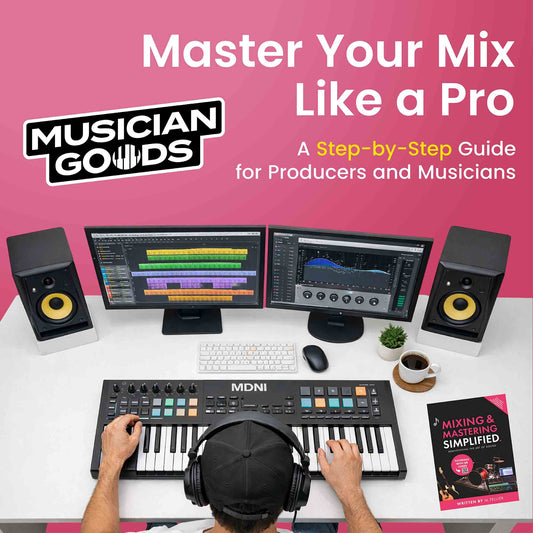
We wrote Mixing & Mastering Simplified as the book we wished existed when we opened our first DAW: a full-colour, diagram-driven walk through EQ ranges, compressor settings tables for every common source, the canonical vocal chain, and a step-by-step approach to mastering. It pairs naturally with any of the seven DAWs on this list — the techniques are DAW-agnostic.
View Mixing & Mastering Simplified →
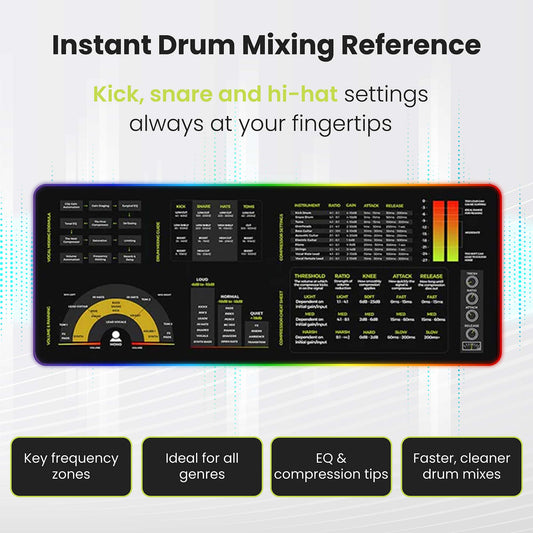
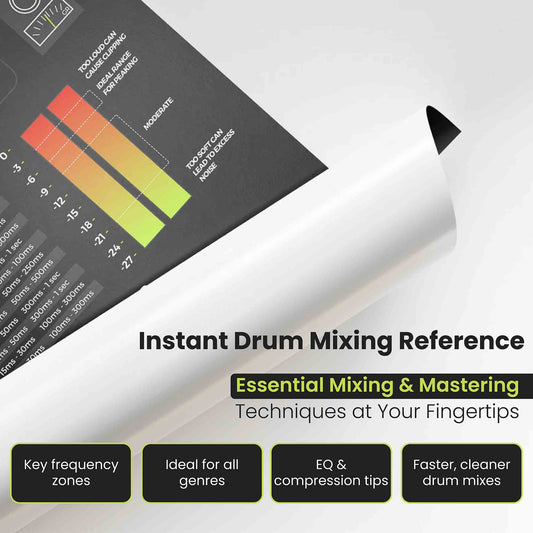
For a printed reference at your desk while you mix, the Mixing & Mastering Cheat Sheet Mousepad and the Instrument Frequency Cheat Sheet Poster put EQ ranges and compressor starting points within arm's reach during a session.
Frequently asked
Do I need a DAW to make music at home?
Yes, if you want to record, edit, arrange, or export anything. The DAW is the place where audio is captured from your interface, MIDI is played back through software instruments, and the final stereo file is exported. There is no realistic workflow for home recording in 2026 that bypasses a DAW.
What's the best free DAW for beginners?
For Mac users, GarageBand. It is free with every Mac and iPad, has a clean upgrade path to Logic Pro, and is more capable than its reputation suggests. For Windows users, Cakewalk by BandLab. It is a former $500 professional DAW now offered free with no track or feature limits.
Is FL Studio or Ableton Live better for beginners making electronic music?
Both work. FL Studio's pattern-based workflow is the more natural fit for hip-hop, trap, and beat-driven electronic music, and the lifetime free-updates promise makes it cheaper over time. Ableton Live's Session View is the better choice if you want to perform live, build sets in real time, or compose by improvising with loops before committing to an arrangement. If you can borrow both for a weekend, do it — the workflows are different enough that one will feel obviously right.
Can I switch DAWs later if I pick the wrong one?
Yes, but it costs about three months of productivity per switch, so try not to do it more than once. Stems (individual audio tracks) export from every DAW on this list as standard WAV files, so audio recordings transfer cleanly. MIDI tracks export as MIDI files and re-import into any other DAW. What does not transfer is plugin settings, automation, and project structure — those have to be rebuilt manually.
Do I need to learn music theory to use a DAW?
No, but you'll get further faster if you understand the basics. A DAW will happily let you stack notes that clash, place chords that don't resolve, and write parts that fight each other in the mix. Knowing why a chord progression works, which scales fit which key, and how intervals shape a melody turns the DAW from a recording tool into a composition tool. For the underlying theory that applies to any instrument or DAW, our book Music Theory Simplified covers the full beginner curriculum in one volume.
How long does it take to learn a DAW?
About a weekend to feel oriented, three months to finish a complete song from start to export, and twelve months to feel genuinely fluent. Beginners who finish one tutorial series end-to-end before opening their second tutorial tend to progress about twice as fast as beginners who jump between tutorials. The instinct to "find the best video" is the most common time sink in the first year.





 Folha de Cola para Mistura e Masterização Mousepad


